

Every part of the operation, connected.
Six capability areas, one record. Each section below explains what the product does, how it behaves in daily use, and which parts of the Knowledge Base cover it in full.
A till that already knows the menu, the stock and the bill.
Everything a business sells traces back to one product and stock catalogue. Categories keep a long list navigable; units cover weight, volume, count and kitchen measures; packaging conversion lets a case received at the dock become individual units on the shelf.
A composed dish is a recipe of confirmed ingredient lines, each with a quantity per portion. Production cost is calculated from the weighted average purchase cost of those ingredients; the sale price is set deliberately per location and service type. A direct-sale item skips the recipe and sells the stock item as itself.
Submitting an order creates its invoice in the same step. The order's status is derived from payment and delivery together — pending, processing, completed — and a cancellation reverses its stock effect automatically. Payments can be recorded in sequence against one invoice, which lets a table settle a shared bill in stages.
- Table, delivery, takeaway and counter orders
- Order and invoice created as one indivisible action
- Recipes with confirmed lines and calculated production cost
- Live floor view; kitchen and receipt printing
- Sequential split payments and batch bill validation
- Discounts with a required reason, up to 100%
- Optional strict stock check at the point of sale
- Direct-sale items for snacks, drinks and retail
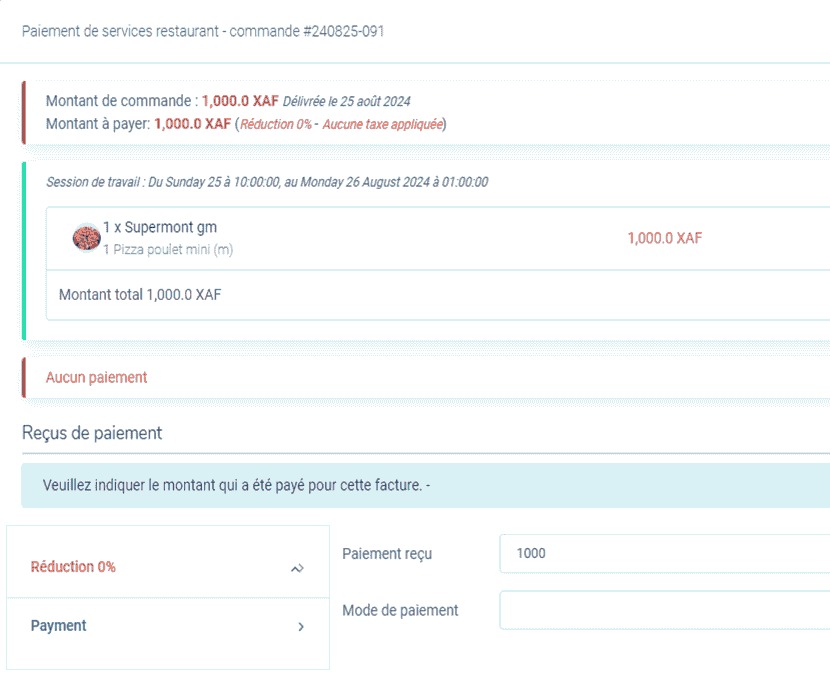
The order and payment screen: one invoice, its session and the running balance in one place.
A reservation is the whole stay, not a calendar entry.
Rentable units are grouped into categories with rate rules — duration, priority and seasonality — so pricing reflects how the property actually sells. A booking locks its rate and dates as a snapshot, so a later change to the general price list does not silently alter a commitment already made.
Every date change re-runs the overlap check, including an extension. Check-in requires a valid invoice and real payment; only then does the front desk prepare the key card. The card is encoded with the room and exact stay dates, and the room releases when checkout confirms the card has come back.
- Units, categories and seasonal rate rules
- Pending, processing, extended, closed, canceled and expired states
- Overlap protection at booking and at every extension
- Automatic expiry of unpaid, un-activated holds
- Guest profiles with stay history and spend
- Folio billing, deposits and outstanding balances
- Magnetic-stripe, contactless and hybrid key cards
- Card return, lost-card, master and maintenance workflows
Checking a guest in never writes a card in the background. A staff member selects the card and presents it at the encoder.
Stock is calculated from what happened, not typed in.
Stock lives in two tiers: the central warehouse that receives from suppliers, and department stock at a location and activity — a restaurant kitchen, a snack counter, a shop floor. Dispatch moves goods between them with a record; a department cannot receive more than the warehouse holds.
Available stock is recalculated from confirmed receiving, confirmed dispatch, sales consumption and recorded usage, then adjusted by physical counts. Because a sale's effect is derived from its status, cancelling an order restores the stock without a compensating entry. When sales outrun department stock, the figure is held at zero and flagged rather than shown as a negative number.
- Central warehouse and department stock tiers
- Receiving with quantity and price correction
- Weighted average cost and supplier price history
- Preventive checks on dispatch and internal usage
- Recipe and direct-sale consumption
- Negative-stock flagging without blocking service
- Physical counts with formal adjustments
- Reorder thresholds and supplier performance
The sale is already in the calculation. If the shelf disagrees, the answer is a physical count — not an arbitrary adjustment.
Every invoice has a transaction behind it.
An invoice is never a free-floating document. It originates from a confirmed booking, a placed order or a rendered service, so the financial record cannot drift away from what the operation actually did. One invoice exists per transaction; a modification updates it rather than creating a duplicate.
Payments are recorded against the invoice, by the method the location accepts, and each one updates the balance immediately. Expenses cover stock purchases, operating charges, payroll and assets, with stock purchases tied to the goods received. Financial periods tag activity automatically and lock their figures when closed.
- Invoices created from bookings, orders and services
- Unpaid, partially paid, paid in full and canceled states
- Overdue indicator against hotel checkout dates
- Multiple payments and partial settlement
- Payment methods configured per location
- Supplier orders, discounts, returns and payables
- Expense categories that separate goods from operating spend
- Financial periods with automatic rollover and close
Staff record what was actually received — cash, transfer, card or mobile money. Each location defines the methods it accepts.
The right dashboard, and a report for the question.
Staff do not choose a dashboard; the platform routes them to one based on role and business type. A manager sees a cross-business summary, an inventory officer sees stock movement and reorder thresholds, a front desk sees occupancy and arrivals, and front-line service staff see the activity of their own shift. The same dashboard follows the manager from desktop to tablet to phone, with the same role and location permissions.
Each widget can be scoped to a period, and a dashboard is a summary layer rather than a report. Reports cover sales, bookings, stock, finance, staff and security, with PDF and Excel export. Notifications carry a type and priority, and security alerts cannot be muted.
- Manager, inventory, bookings and common dashboards
- Widgets by period and drill-down to reports
- Sales, booking, stock, financial and session reports
- Notification bell, email and optional browser push
- Live booking, notification and card-encoding updates
- PDF and Excel export from the same figures
- Shift, period and custom date-range reporting
- Security and login activity reports
Bookings, notifications, announcements, card encoding and activity within the same shift update open screens live. Some screens, including parts of the kitchen queue, refresh periodically.
Shifts, roles and settings that hold the operation together.
A shift — called a work session in the platform — is a block of time at one location and one business activity, staffed by a known team. It can be created by hand or generated from a recurring template, and it moves from pending to active to completed on its own. Every sale and stock movement is tagged to it.
At close, the platform compares expected cash and stock against what was counted and recorded, and any difference becomes a categorized variance with a severity and an investigation status. Roles decide who can act; branding makes the platform look like the business; settings cover security, operations, notifications and finance.
- Manual shifts or recurring templates
- Automatic activation, completion and overlap prevention
- Cashier and team-lead designations
- Stock snapshots and cash reconciliation at close
- Categorized variances with investigation status
- Ten staff roles, assigned per location
- Business branding across app, documents and email
- Direct printing and a graceful download fallback
A manager approves the shift after every discrepancy has been reviewed, not because the total looks reasonable.
The Knowledge Base has the detail behind every screen.
Twenty-two chapters cover the workflows, business rules, reports, settings, scenarios and troubleshooting — written for staff, managers and decision makers, not engineers.
See these capabilities against your own workflow.
A demo is a working conversation, not a slide tour. Bring a real shift, a real booking or a real stock problem.